Find answers faster.
Search setup guides, troubleshooting articles, product help,
admin controls, AI Meeting Summary guidance, integrations,
billing, and support resources for Zoiko Sema.
Popular Articles
Setting up Okta SSO for Enterprise
Learn how to configure Single Sign-On using Okta for your entire organization's...
Automating Your Daily Stand-up
Configure ZoikoTime to automatically prompt and collect daily status updates...
Understanding Data Encryption
A comprehensive overview of how Zoiko Sema handles end-to-end encryption for...
Configuring AI Meeting Summaries and
Action Items
Ensure you have Workspace Admin privileges and that the 'Enterprise AI' module is active in your
subscription plan.
Step-by-Step Guide
Navigate to the Admin Console
Log in to your Zoiko Sema workspace and select the gear icon in the bottom left sidebar.
Enable 'Sema AI' for Meetings
Under the "Feature Management" tab, toggle the switch for Meeting Summaries to "Active".
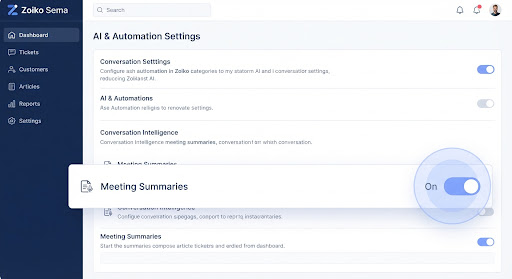
 EXPECTED RESULT
Once enabled, all users will see an 'AI Recap' button during active video meetings, and summaries will
automatically post to relevant channels after completion.
Was this article helpful?
Our Support Philosophy
From self-serve resources to direct engineer access, we guide you through every step
of resolving your query.

Search

Suggested Articles

Troubleshooting

Create Ticket

Track Status
Contact Support
Tell us what's going on and our specialists will help you resolve it.
Frequently Asked Questions
Go to Settings > Integrations and select 'Notion'. Authorize your workspace, then toggle the 'Auto-Export AI Recaps' option. You can choose specific databases for different channels.
No. Your data is isolated to your organization and is not used to train our base AI models. We maintain a strict zero-data retention policy for AI processing.
Our Enterprise plans include a 99.99% financially backed uptime guarantee (SLA). We provide 24/7 prioritized support for any critical disruptions.